
How to Pack a TV for Moving (Step-by-Step Guide That Actually Works)

 Megashift
 Packing a TV for moving comes down to one core process: wrap the screen, protect the corners, box it upright, and keep it that way throughout the journey. Simple in theory, but moving a TV sounds easy until you plug it in at your new place and see a spider-web crack spreading across the screen.
Flat-screen TVs are thinner, lighter, and more fragile than ever, and one wrong move during packing or transport can cause invisible internal damage that only shows up when you power it on.
This guide covers everything you need to know, in the right order, with zero fluff.
What You Need Before You Start

Do not touch the TV until you have these supplies ready. Scrambling mid-pack is how mistakes happen.
| Category | Supplies |
| Cleaning | Microfiber cloth, distilled water or screen cleaner, compressed air |
| Wrapping | Anti-static bubble wrap, moving blankets, foam corner protectors, stretch wrap |
| Boxing | Original TV box OR a TV moving box, heavy-duty packing tape |
| Organising Cables | Ziplock bags, velcro cable straps, sticky labels, marker |
| Bonus | Silica gel packets (great for humid or rainy-season moves) |
No original box? Check your nearest appliance or electronics store. They regularly give away large flat-screen boxes for free. A purpose-built TV moving box from Home Depot or U-Haul costs $15 to $30 and is completely worth it.
How to Pack a TV for Moving: Step-by-Step
Follow these steps in order and you will have your TV packed safely in under 40 minutes. Skip none of them, each one exists for a reason.
Step 1: Photograph Everything Before Unplugging
Spend 60 seconds doing this and save yourself 20 minutes of confusion at your new home.

Take clear photos of:
- The back of the TV showing every cable and which port it sits in
- Your full entertainment setup
- The wall bracket position if the TV is mounted
You will absolutely forget which HDMI port went where. The photo fixes that.
Step 2: Unplug, Label, and Pack All Cables
With your reference photos saved:
- Power the TV off completely, not just standby mode
- Unplug every cable from the back, including HDMI, power cord, optical audio, and coaxial
- Coil each cable loosely and secure with a velcro strap (tight coiling damages internal wiring)
- Label each cable clearly: “HDMI 1 = Cable Box,” “Optical = Soundbar”
- Pack everything, including the remote, batteries, and manual, into one labeled ziplock bag
- Keep that bag with the TV, not buried in a random box
Step 3: Remove the Stand or Wall Mount
For a TV stand:
Lay the TV face-down on a folded blanket on a flat surface. Unscrew the stand and drop the screws into a small bag. Tape that bag directly to the stand so nothing gets separated.
For a wall mount:
Get a second person before you start. One person removes the bolts while the other supports the TV weight. Store wall mount hardware separately and label the bag clearly since mounting hardware from different brands is not interchangeable.
If you are not confident removing a wall mount yourself, hiring a professional packing and moving company is worth it. A small service fee is far cheaper than replacing the TV.
Step 4: Clean the Screen
Packing a dirty screen traps dust and grit between the screen and the wrapping material. During transport, even small vibrations grind that grit against the panel, causing micro-scratches. According to research by the Society of Tribologists and Lubrication Engineers, particulate contamination between surfaces under repeated low-amplitude vibration is one of the leading causes of surface micro-abrasion in transit.
How to clean correctly:
- Let the TV cool down for 10 minutes after powering off
- Use compressed air to blow dust out of vents, holding the can upright
- Wipe the screen gently in circular motions with a dry microfiber cloth
- For stubborn smudges, lightly dampen one corner of the cloth with distilled water
What to avoid:
| Do Not Use | Why |
| Windex or glass cleaner | Contains ammonia, strips anti-glare coating |
| Paper towels | Rough enough to cause fine scratches |
| Rubbing alcohol (unless specified by manufacturer) | Damages screen coatings |
| Spray directly on the screen | Liquid can seep into the bezel and damage internals |
Step 5: Wrap the TV Screen
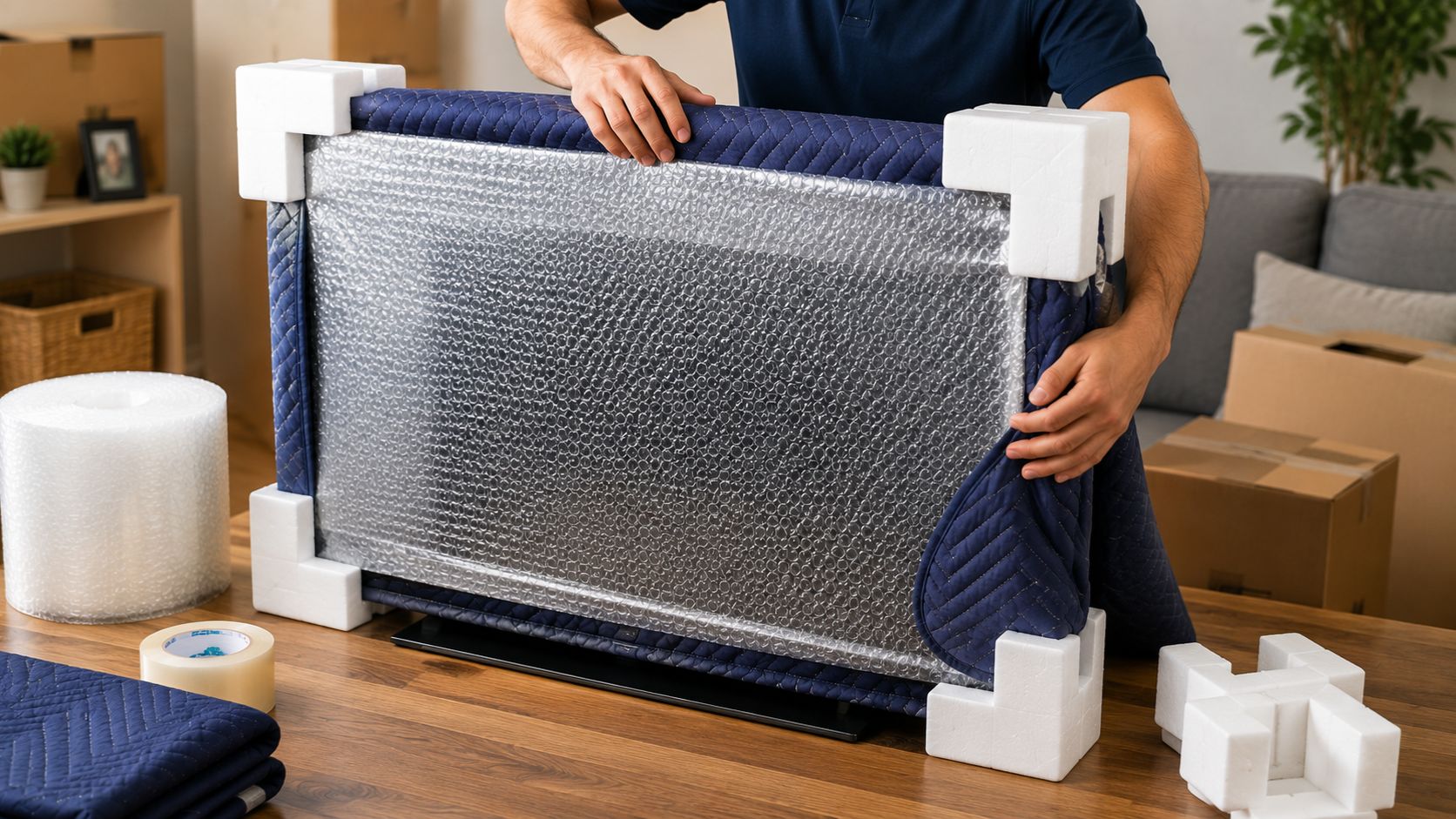
The screen is the single most vulnerable part of the entire unit. Layer your protection. If you are also moving other delicate items, our guide on how to pack fragile items safely covers the same layering principles for everything breakable in your home.
Best option: Original foam inserts
If you kept the box the TV came in, this is the gold standard. The foam was custom-molded for your exact model.
Second best: Screen cover + moving blanket
- Slide a flat-screen TV cover over the screen side (sized 32″ to 86″, available for $10 to $20)
- Wrap with stretch wrap, going around several times without pulling too tight
- Clip foam corner protectors onto all four corners
- Wrap the whole TV in a moving blanket or thick furniture pad
- Secure the blanket with tape on the back side only, never let tape touch the screen or bezel
Last resort: Anti-static bubble wrap
Two to three layers around the screen, followed by a blanket over the top. Regular bubble wrap generates static that is harmful to electronics, so anti-static is the only acceptable version here.
Step 6: Box the TV
Using the original box:
Place the bottom foam insert inside, lower the TV in screen-side facing as indicated, add the top foam, close, and seal every seam with heavy-duty packing tape.
Using a TV moving box:
- Assemble and line the bottom with crumpled packing paper or a folded blanket
- Slide the wrapped TV in with a helper, it should not go in solo
- Fill all gaps on sides and top with bubble wrap or packing paper
- Shake the box gently: if the TV shifts at all, add more padding until it does not
- Drop two or three silica gel packets inside before sealing
- Tape all seams securely
Choosing the right types of packing materials for each layer matters more than most people realise. The wrong material in the wrong place is almost as bad as no protection at all.
Label the box on every side:
- FRAGILE
- TV
- THIS SIDE UP with arrows
- Destination room name
Labels are not optional. Movers handle dozens of boxes and without a fragile marking, your TV box could end up at the bottom of a pile.
Step 7: Load the TV Into the Moving Vehicle
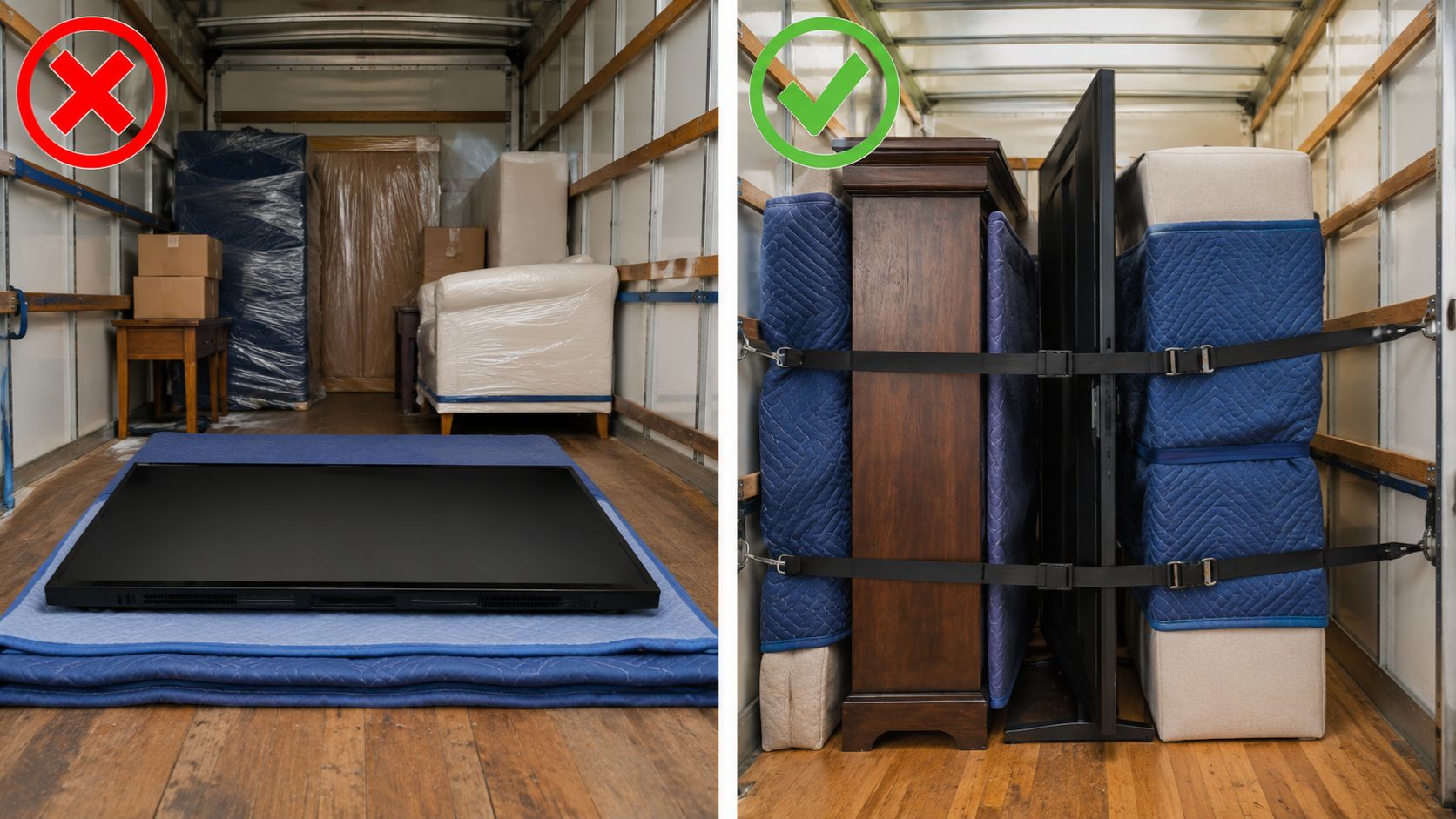
This is where most damage actually happens, not during packing but during the drive. The Federal Motor Carrier Safety Administration (FMCSA) guidelines on cargo securement specify that all items in transport must be restrained against forward, rearward, lateral, and vertical movement, which applies directly to how your TV should be positioned in any moving truck or vehicle.
| Rule | Why It Matters |
| Always keep the TV upright | Laying it flat puts the panel’s full weight against itself and causes internal pressure damage |
| Screen faces inward or toward something soft | Hard walls and furniture corners are the enemy |
| Position it between solid items | Wedge it snugly between a sofa and the truck wall so it cannot tip |
| Use tie-down straps if available | Prevents the TV from lurching forward during hard braking |
Moving in a car? Stand the TV upright in the back seat and use rolled blankets on both sides to keep it from tipping. Make sure it does not block your rear view.
Step 8: Unbox and Set Up at Your New Home
You are almost there. Do not rush this last part.
- Set the box down in the right room before opening it
- Slice tape carefully with a box cutter, shallow cuts only
- Lift the TV straight out by the sides with a helper, never by the screen
- Wait 30 to 60 minutes before plugging in. If the TV moved through temperature extremes, its internals need to stabilize. The Consumer Electronics Association recommends allowing electronics to reach ambient room temperature before powering on after exposure to cold or heat during transport
- Use your reference photos to reconnect all cables
- Power on and test every input before considering the job done
Mistakes That Ruin TVs During Moves
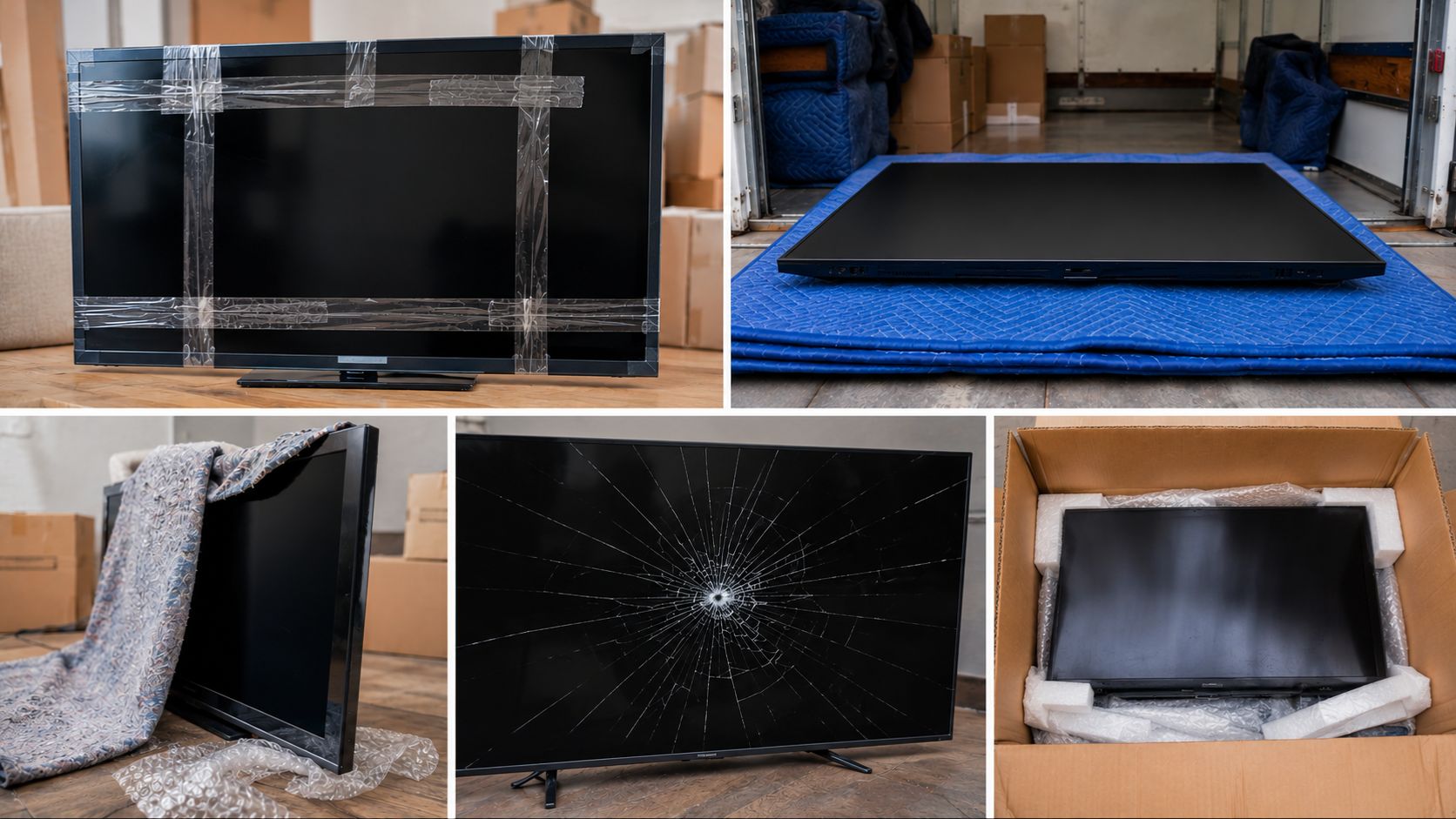
| Mistake | What Actually Happens |
| Laying the TV flat | Internal screen pressure causes fractures that show as dark spots when powered on |
| Tape touching the screen or bezel | Adhesive permanently strips anti-reflective coating |
| Using newspaper as padding | Ink transfers onto the bezel and is very difficult to remove |
| Skipping the acclimation period | Condensation forms inside the panel and shorts components |
| Not labelling the box as fragile | Box gets stacked under heavy items by movers |
| Rushing the wrapping | Uneven padding leaves pressure points that cause cracks |
Even experienced movers make these errors under time pressure. Our moving tips and tricks guide covers how to build a moving day schedule that gives you enough time for each task without the last-minute rush that causes these mistakes.
Do You Actually Need a TV Moving Box?
| TV Size | Recommendation |
| Under 40 inches | Thick blanket wrapping with upright placement in truck is usually sufficient |
| 40 to 65 inches | A TV moving box is strongly recommended |
| 65 inches and above | A purpose-built box is essential, consider professional packing |
Cost reality check:
| Option | Estimated Cost |
| Original box | Free |
| TV moving box | $15 to $30 |
| Professional TV packing service | $50 to $150 |
| Replacement cost for a cracked 65-inch TV | $500 to $2,000+ |
If you are weighing up the full cost of your move including professional help, our breakdown of how much a moving company costs for furniture removal gives you real numbers to work with.
Full Packing Checklist
- Photo of cable setup saved
- All cables unplugged, labelled, and bagged
- Stand or wall mount removed, screws stored separately
- Screen cleaned with microfiber cloth
- Screen cover or anti-static bubble wrap applied
- Foam corner protectors on all four corners
- Moving blanket wrapped around full TV
- TV placed inside box with all gaps padded
- Silica gel packets added before sealing
- All box seams sealed with heavy-duty tape
- Box labelled FRAGILE and THIS SIDE UP on all sides
- TV loaded upright in the vehicle
- TV allowed 30 to 60 minutes to acclimate before powering on
Frequently Asked Questions
Can I lay my flat-screen TV flat when moving?
No. Laying it flat puts uneven pressure across the panel, which can cause internal fractures that appear as dark patches or lines when you power it on.
Do I need the original box to safely move my TV?
No. A purpose-built TV moving box with corner protectors and blanket wrapping works well. The original box is ideal but not essential.
What is the best way to wrap a TV without a box?
Use a flat-screen TV cover, foam corner protectors on all four corners, and a thick moving blanket secured with stretch wrap. Keep the TV upright throughout.
Can I transport a TV in my car?
Yes, as long as it stays upright in the back seat with blankets wedged on both sides. Never lay it flat in a boot or cargo area.
How long should I wait before turning on a TV after moving?
At least 30 minutes, and up to 60 minutes if it was exposed to cold or heat. This prevents condensation damage inside the panel.
Is regular bubble wrap safe for a TV screen?
No. Use only anti-static bubble wrap. Regular bubble wrap generates static electricity that can damage sensitive electronics.
Should I hire professionals to pack my TV?
For TVs over 65 inches or expensive OLED displays, professional packing is worth it. For standard screens under 50 inches, careful DIY packing following this guide is sufficient. Check our guide on best practices for packing and moving fragile items if you have multiple fragile items to pack alongside your TV.
What do I do if my TV screen cracks during the move?
Check your homeowner’s or renter’s insurance first. If you used professional movers, file a claim immediately with photos as evidence. Understanding your insurance coverage for furniture removal before moving day is the best way to protect yourself financially.
Final Thoughts
Packing a TV for moving takes 30 minutes when done right and costs nothing when it goes wrong. Keep it upright, clean before you wrap, and give it time to acclimate on arrival. That is really all it takes.
For a full house move with experienced hands, Megashift Logistics brings the right equipment and trained crew to protect everything from your largest screen to your most fragile items.
Recommended Posts

10 Expert Moving Tips for a Stress-Free Move in 2026
November 3, 2025

7 Things To Leave Behind The Next Time You Move
May 7, 2021

Office Moving Checklist 2021
January 19, 2021